The HPDrive Project
Why and how
If you got a working vintage computer system like the HP 9845 you probably want use some mass storage as well. Since today most of the built-in tape drive systems fail (and because using those tape drives as storage - even if they do work - is not recommended anyway), another type of mass storage peripheral is needed.
If you own one, a floppy disk drive like the 9895A is certainly a good choice, of course in combination with the appropriate 98034A/B HP-IB interface. If you can't find a 9895A drive or any other mass storage in working condition, emulating a real vintage drive on a conventional PC is an attractive alternative. Since the 98034A interface is the only peripheral interface which is directly supported by the 9845 operating system (besides the 98041A disk interface), it is probably a good idea to build this emulator for use with an HP-IB connection. At the PC side, only a suitable IEEE488/GPIB interface card is needed, plus the emulator program itself.
The dedicated IEEE488/GPIB interface still is the best choice for compatibilty with old HP-IB systems and in case of doubt (in terms of compatibility) superior to home-brew solutions since those industry solutions have in general been designed and tested thoroughly against the standard. And emulating a real drive behind an IEEE488/GPIB interface has the advantage that drive functionality is totally transparent for the host and there is NO change needed on the host side (such as creating new drivers etc.).
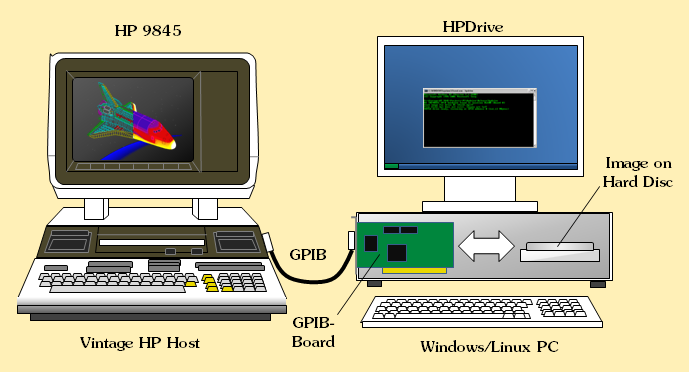
HPDrive Setup
Beyond replacing a vintage HP-IB mass storage drive, an emulator has some additional advantages:
- Since the data is actually stored at the PC side, it is easy to use this way to exchange data with the PC, just through transferring the data to and from the emulated drive storage.
- The emulator can use binary image files as replacement of real mass storage media, so direct archiving is simplified.
- The emulator can be configured to simulate different types of drives, firmware revisions and media.
- The emulator can work with much higher speed than the original drives.
Certainly, an emulator will never really replace the feeling with a real vintage drive, reading real vintage floppies, making all that noise, and drawing lots of power. But it can be quite useful, especially if you don't own other mass storage in working condition.
So I decided to do all that work, scanning all the HP-IB commands which go forth and back between a 9845 host and the peripheral, checking out the manuals which describe higher level HP-IB based command sets like the AMIGO command set, finding out how to low level program those GPIB boards under modern operating systems and whatever was needed to get this task done.
The result was a mass storage emulator program: the HPDrive utility. HPDrive runs as a console application under Linux, Windows 9x, ME, NT, 2000, XP, Vista, Windows 7, Windows 8 up to Windows 10/11. It now supports the AMIGO, the CS/80, and the SS/80 command sets, early semi-device-independent peripheral controls used over an underlaying HP-IB connection. Those protocols were quite popular at the time of the 9845s, and even the systems which followed the 9845s like the series 80 or series 200 systems mostly supported AMIGO based drives like the 9895A, the 82901 or the 9121. CS/80 and SS/80, which were successors of the AMGIO command set, are widely implemented, however since documentation of CS/80 and SS/80 hard drives in general doesn't include a description of certain drive side routines (so-called "utilities") and functionality is hard to guess, utilities - as far as they are used by host drivers - may or may not work.
HPDrive is by far not restricted to HP 9845 computers. Due to its generic design, it is now supporting many combinations of host systems and HP-IB drive emulations. However, since my personal focus is mostly on the HP 9845 series in combination with the emulation of the standard drives which are supported by this system, in general this is what is most thoroughly tested. But Series 80, 200, 300, 1000 and 64000 seem to work pretty well, too. Also many instruments which use HP-IB drives as mass storage. Even the Viper cards (HP's measuring coprocessor cards) are running with HPDrive.
Most delicate are so-called system boot loaders. They are responsible for loading an operating system from mass storage into R/W memory during the process of bootstrapping, and are usually part of the system firmware. Since the code had to fit into the system ROM, they never implement the full HP-IB standard and normally expect a certain timing behavior of the drive they are talking to. Sometimes here are the limitations of an emulator, since it does not exactly reproduce the special drive hardware, but rather tries to be a 'good' HP-IB device in general. Once the operating system is loaded, the integrated HP-IB mass storage drivers (as they are much more sophisticated than boot loaders) work perfectly with HPDrive, however in some rare cases boot loaders may fail with HPDrive in its standard configuration.
Also see another program, the HPDir utilitiy for accessing images plus real floppies and real vintage disk and tape drives from a PC in the HPDir Project section. Also see the HP-IB Tutorial for more information on the HP-IB.
As a last word in this introduction, I did create HPDrive for myself, and not for anyone else. However it allows me things to do, which would be selfish not to share it to others. So I would be glad if this utility helps you to have fun with your old beauties, too. I'd like to thank everyone who gave me feedback, and I'd like to give special thanks to Dave, he gave me many great suggestions on how to improve functionality & usage. He did exhaustive testing against HP's original exercisers on some of the original platforms and tirelessly convinced me to implement things at the expense of more than one night I had to spend on programming & testing, and gave me feedback in a very professional way in order to reach a high level of accuracy in emulation, especially for the magtape emulation. He also contributed some of the application hints for using HPDrive with HP 64000 and HP 1000 which you can find on this page.
Background: The AMIGO Command Set
In 1978 HP released a new multi-user computing system called HP 300. Although technically ahead of time, it wasn't much successful. One of the design principles of the HP 300 was to utilize the HP-IB for peripheral communication. In order to standardize the operation of mass storage equipment, a special command set was defined, which could be used to initiate and control operations like formatting and initializing media, reading and writing data, doing status reporting, performing diagnostics and some others. The name of the HP 300 operating system was AMIGO, so the command set was named AMIGO command set.
The basic principle of the AMIGO command set was to implement high level commands by sending HP-IB commands and by sending and receiving data. In general, each AMIGO command consists of four steps:
- First the peripheral device is addressed as either listener or talker (depending if it was intended to write data to or to read data from a device).
- Next a secondary command is issued, indicating the command group (e.g. read data) the command belongs to. If there are more than one command in the command group, the specific command is identified by an extra byte, the operation code.
- If appropriate, a number of parameters can be issued or data from the peripheral device can be received.
- Finally the command sequence is completed by the HP-IB untalk or unlisten command.
Some operations need two commands for one complete operation, for example the device status is first requested with one command and then the data is acquired with a second command.
The AMIGO command set is closely bound to the HP-IB protocol. Some techniques used by the AMIGO directly utilize features of the HP-IB. So device identification is done by the so-called AMIGO identify, which is just an HP-IB untalk, followed by a secondary which carries the address of the target device, which then should send its two-byte identification code as reply. This AMIGO identify still causes a lot of problems, since on one side its non-standard use of the IEEE-488 bus irritates some of the IEEE-488 PC cards, and on the other side it prevents the 9845 from operating with peripheral devices which - although they understand the AMIGO command set - are rejected just because the 9845 strictly works only with specific known device IDs. Even worse, because of the non-standard nature of this command, the AMIGO identify is extremly hard to implement since it requires register level access. The current NEC µPD7210 implementation is based on using the HP-IB UNTALK command (31) as secondary board address, which is not possible on other GPIB controller chips like the TMS9914 or high-level APIs like NI 488.2 (see the HP-IB Tutorial for more information on the Identify command).
Another example for an implementation very close to the HP-IB is the way the peripheral device holds off the host from sending commands too quickly (i.e. sending a command before the processing of the preceding command has not yet been finished). This hold-off mechanism is based on the HP-IB parallel poll feature. As long as a peripheral device is busy, it just deactivates its response to a parallel poll. So when sending a command to a peripheral device, the host should send parallel poll requests in short intervals until the poll is successful, just to be sure that the next command can be accepted. This mechanism is the reason why only primary addresses between 0 and 7 should be used for mass storage devices, since the parallel poll answering line is directly coupled with the address (address 0 uses line 7, address 1 uses line 6 etc.). It is obvious that such a polling mechanism is not as efficient as a request-reply scheme, but it works.
The AMIGO command set was implemented in the HP 9845 as well as in a couple of mass storage devices. As stated above, some of those devices are not supported by the HP 9845 just because the HP 9845 rejects their identification code (a limitation which was overcome by a special mass storage ROM from Structured Software Systems). Here are the devices which implement the AMIGO command set, and whether they are supported by the HP 9845 or not (note that there are combo and non-combo variants for most base types):
| Name | Type | Supported | Base | ID | Units | |
| 9895A | 8" Floppy Disk | HP1,SSS | 9895A | $0081 | 2 | |
| 82901M | 5.25" Floppy Disk | SSS | 82901 | $0104 | 2 | |
| 82902M | 5.25" Floppy Disk | SSS | 82901 | $0104 | 1 | |
| 9121D | 3.5" Floppy Disk 2) | SSS | 9121 | $0104 | 2 | |
| 9121S | 3.5" Floppy Disk 2) | SSS | 9121 | $0104 | 1 | |
| 9133A | Hard Disk & 3.5" Floppy Disk Combo 1) | SSS | 9134A | $0106 | 1+1 | |
| 9134A | Hard Disk 1) | SSS | 9134A | $0106 | 1 | |
| 9135A | Hard Disk & 5.25" Floppy Disk Combo 1) | SSS | 9134A | $0106 | 1+1 | |
| 9133V | Hard Disk & 3.5" Floppy Disk Combo 1) 3) | SSS | 9134A | $0106 | 1+1 | |
| 9133B | Hard Disk & 3.5" Floppy Disk Combo | SSS | 9134B | $010A | 1+1 | |
| 9134B | Hard Disk | SSS | 9134B | $010A | 1 | |
| 9133XV | Hard Disk & 3.5" Floppy Disk Combo 3) | SSS | 9134XV | $010F | 1+1 | |
| 9134XV | Hard Disk 3) | SSS | 9134XV | $010F | 1 | |
| 7910 | Hard Disk | HP2 | 7910 | $0001 | 1 | |
| 7905 | Hard Disk (Fixed & Removable) | HP2 | 7905 | $0002 | 2 | |
| 7906 | Hard Disk (Fixed & Removable) | HP2 | 7906 | $0002 | 2 | |
| 7920 | Hard Disk | HP2 | 7920 | $0002 | 1 | |
| 7925 | Hard Disk | HP2 | 7925 | $0002 | 1 | |
| 7970E | Magnetic Tape 4) | HP3 | 7970E | $0183 | 1 |
Notes:
- Supported: 'HP1' denotes HP Mass Storage ROM Rev. B or later, 'HP2' denotes HP Mass Storage ROM Rev. C or later, 'HP3' stands for a loadable tape driver binary, and 'SSS' denotes third party Mass Storage ROM from Structured Software Systems.
- All combo drives use an 92801 emulation for their floppy disk drive, except the XV types, which emulate a 9121 with extended AMIGO command set.
- The 7905, 7906, 7920 and 7925 drives (also referred to as 79xx drives) need special interfaces, either a 98041 disk interface (for a 9845 system) or a 12745 HP-IB disk interface.
Footnotes:
1) may be configured as 4-unit logical 9895A drive with 1.15 MB for each unit
2) physical media format is 3.5" SS/DD with 70 cylinders, identifies as 8290xM
3) floppy drive in combo emulates 3.5" (9121S) floppy disk drive (extended command set)
4) the AMIGO protocol for tape drives works similar to that of that for the disk drives, but uses a modified command set
The AMIGO command set was later replaced by the CS/80 command set (CS is just an acronym for 'command set'). Main features of this new command set were a new device independent channel model, as well as support for tape storage and for device dependent subroutines. A special subset with a restricted number of commands and parameters just implementing the most common features was defined in order to simplify implementation especially for smaller mass storage devices. This subset was consequently named SS/80. The SS/80 protocol was used by smaller drives including the 9133D/H/L, the 9134D/H/L, the 9122D/S, the 9153A and the 9154A. The 9845 has some basic support for CS/80 drives, namely the 7908, 7911 and 7912 drives, which are supported by the Mass Storage ROM Rev. C and later. The largest drive storage supported by the 9845 is a CS/80 drive, too: the 7933/7935, which provides up to 3x404 Mbyte = 1.2 GByte (!) storage to the 9845.
There is no complete specification of the AMIGO command set available. However different description of the AMIGO command set can be found as part of several peripheral device manuals (e.g., the 9895A service manual, see hpmuseum.net for download). Note that not all AMIGO features are implemented by all peripheral devices.
Specification of the CS/80 command set can be found in the CS/80 Instruction Set Programming Manual which is available for download here. A specification for the SS/80 command set can be downloaded here.
Background: Implementation Challenges
Emulating an AMIGO or CS/80 mass storage device is not an easy task for several reasons.
The most severe problem lies in the implementation of the AMIGO Identify command, which is used both with the original AMIGO and the CS/80/SS/80 command set. As already mentioned above, this command consists of an HP-IB UNTALK with a following secondary command holding the primary address of the drive, which is completely non-standard with respect to IEEE488. The reason why HP designers did chose this way of identification is not completely clear. As a matter of fact, it prevents many non-HP mass storage solutions to work together with HP computer systems. If a device doesn't respond to an AMIGO identify with the appropriate reply, HP's HP-IB system software will refuse further communication with the device. And it makes it impossible to use high-level interfaces for PC GPIB controller boards, since those high-level APIs generally implement the IEEE488 standard only. Also non-standard is the behavior of the AMIGO drives to abort their operations when being untalked or unlistened during an operation. Finally, the HP hosts, when talking to AMIGO drives, tend to assert the ATN line before the transfer has been completed, which gets lots of standard implementations into trouble.
The current NEC µPD7210 implementation therefore operates on register level and uses a special, NEC µPD7210 specific hack to get the AMIGO identify command working. However, since there is no way to implement the AMIGO identify on the other classic, the TI TMS9914, this chip probably will never be supported for HPDrive (although it works well with HPDir). Same applies to to NI488.2 standard API and many others. Simply said, GPIB chips based on the NEC µPD7210 industrial standard can be used for emulating HP-IB drives, and all others can't. Which still opens a large range of choices, including even state-of-the-art GPIB boards like NI's PCI-GPIB.
Anyway, the most complex task was to bring the HPDrive emulator on a PCI board. I chose National Instruments PCI-GPIB since it is some kind of industry standard for PCI based GPIB boards. But I could not avoid the need to implement a completely new driver for this PCI board (so-called "custom TNT4882/TNT5004 driver"), which gives access to all those GPIB device functionality which is implemented into the TNT4882C and the TNT5004 chips, but hidden behind the NI488.2 API. Recently I also added support for NI's PCMCIA-GPIB and PCMCIA-GPIB+ hardware.
Another difficult aspect is emulating the correct HP-IB hold-offs and timing. If the emulator doesn't behave exactly like the original device, communication with HP computer systems will result in a sequence of communication errors. What makes proper timing even harder to implement, is that the emulator should run on platforms with different performance classes. And the problem even gets worse with 'dumb' host GPIB drivers as often found in boot loaders, which use tight timeouts instead of proper protocol handshaking. However the timing resolution available under Windows within User Level is one millisecond, which is far too long for controlling proper HP-IB timing. And writing real GPIB drivers for several GPIB boards under Windows is beyond this project.
With respect to the problems mentioned above, the current implementations for the NEC µPD7210 and all of its descendants like the TNT4882C/TNT5004 seem quite stable.
The HPDrive Mass Storage Emulator
HPDrive implements almost the full AMIGO and CS/80 command set, and can be configured to emulate nearly arbitrary drives by configuring common drive parameters like drive geometry, Identify response and so on. HPDrive has built-in support for the following floppy disk, hard disk and tape drives:
All AMIGO disk drives:
9895A, 8290xM, 9121D/S, 9134A, 9134B, 9134XV, 7910, 7905A, 7906, 7920, 7925, and combos (9133A/B/XV, 9135A)
All AMIGO tape drives:
7970E, 7974, 7976, 7978, 7979
CS/80, SS/80:
9122D/S, 9134D, 9134H, 9134L, 7908, 7911, 7912, 7914, 7941A, 7945A, 9144A, 7957B, 7958B, 7959B, and combos (9133D/H/L, 7942A, 7946A etc.)
Others, which are currently not supported (mostly due to unknown ID word) include:
9153A/B/C, 9154A/B, 7907A, 7957A, 7958A, 7959A
Run HPDrive with the -presets parameter to get a complete list of drives supported by a specific version. You even can specify your own drive configurations by adding appropriate entries to the HPDrive configuration file. See the Configuration section below for how to add your own drive.
Here are the most important drive parameters for the most common AMIGO drives as used with an HP 9845 system:
| Drive | 82901 | 9121 | 9895 | 9134A | 9134B | 9134XV | 7910 |
| ID | $0104 | $0104 | $0081 | $0106 | $010A | $010F | $0001 |
| Image Size (Bytes) | 286,720 | 286,720 | 1,182,720 | 4,856,832 | 9,713,664 | 14,570,496 | 12,042,240 |
| Phys. Cylinders | 35 | 35 | 77 | 306 | 306 | 306 | 735 |
| Phys. Heads | 2 | 2 | 2 | 2 | 4 | 6 | 2 |
| Phys. Sectors/Track | 16 | 16 | 30 | 31 | 31 | 31 | 32 |
| Phys. Records | 1,120 | 1,120 | 4,620 | 18,972 | 37,944 | 56,916 | 47,040 |
An here are the most common CS/80 drives supported by the HP 9845:
| Drive | 7908 | 7911 | 7912 |
| ID | $0200 | $0204 | $0208 |
| Image Size (Bytes) | 16,576,000 | 28,606,464 | 66,748,416 |
| Phys. Cylinders | 370 (plus spares) | 582 | 582 |
| Phys. Heads | 5 | 3 | 7 |
| Phys. Sectors/Track | 35 | 64 | 64 |
| Phys. Records | 64,750 | 111,744 | 260,736 |
Note: All drive parameters are shown as reported through the HP-IB interface, the actual physical media characteristics may differ (e.g. for the HP-IB interface, the 9121 emulates a 35-cylinder 2-head 82901 drive, but actually is a 70-cylinder single-head floppy disk drive).
In emulation of drives, HPDrive uses a so-called binary image file for storing the disk data. The format of those files is pretty generic, they just represent the records on the disk in ascending order (records are logic units comparable to the LBAs on modern disk drives and correspond to the physical sectors of a disk). Since in general most of the simulated disk space is empty, you can achieve high compression rates when archiving those images in ZIP files.
The size of the image files varies with the type of drive emulated. Due to the generic nature of the image format, it is in most cases possible to launch HPDrive with an image which was produced for another drive type (HPDrive will complain about a wrong image size, but will not refuse operation). The recommended way, however, is to use another utilitiy, the HPDir program in combination with the -convert action, to convert an image from one drive type into another. The images provided on this site in general have the right size for drive type 9895A. This also is the default for HPDrive, since the 9895A provides enough space for most applications, and probably is supported by most vintage HP host systems and therefore may be considered as the most 'compatible' drive ever produced by HP.
If you wonder why combo drives like the 9133 are not included in the above table, you simply have to consider combo drives as combination of two different drives from the table above. For example, the 9133 is a combination of a 9134 hard disk plus 9121 floppy. So for emulating the hard disk part of a 9133, simply use the 9134 emulation.
Just like real drives, media emulated by HPDrive are initially blank and have to be formatted before use. Every operating system uses its own choice of file system, so the format may differ between the operating systems. In fact, formatting is not a matter of HPDrive (just like real drives, it reads and writes disk or tape sectors without caring about the content).
However, due to differences in size, each emulated drive normally has its own directory data. Just as an example, here are the 9845 file system characteristics for some drives:
| Drive | 82901 | 9121 | 9895 | 9134A | 9134B | 9134XV | 7910 |
| Interleave Factor | 7 | 7 | 7 | 7 | 7 | 7 | 1 |
| Sectors per Track | 16 | 16 | 30 | 31 | 31 | 31 | 32 |
| Accessable Tracks | 66 | 66 | 150 | 608 | 1,220 | 1,830 | 1,470 |
| Accessable Records | 1,056 | 1,056 | 4,500 | 18,848 | 37,820 | 56,730 | 47,040 |
| System Start | 0 | 0 | 0 | 0 | 0 | 0 | 0 |
| Directory Start | 1 | 1 | 1 | 1 | 1 | 1 | 1 |
| Directory Size | 8 | 8 | 22 | 92 | 123 | 123 | 143 |
| Alloc Table Start | 9 | 9 | 23 | 93 | 124 | 124 | 144 |
| Alloc Table Size | 7 | 7 | 7 | 62 | 62 | 62 | 48 |
| Spare Dir Start | 17 | 17 | 31 | 156 | 187 | 187 | 193 |
| Spare Alloc Start | 25 | 25 | 53 | 248 | 310 | 310 | 336 |
| File Area Start | 32 | 32 | 60 | 310 | 372 | 372 | 384 |
| System Tracks | 2 | 2 | 2 | 10 | 12 | 12 | 12 |
| Data Tracks | 64 | 64 | 148 | 598 | 1,208 | 1,818 | 1,458 |
| Data Records | 1,024 | 1,024 | 4,440 | 18,538 | 37,448 | 56,358 | 46,656 |
| Max. Total Storage | 270,336 | 270,336 | 1,152,000 | 4,825,088 | 9,681,920 | 14,522,880 | 12,042,240 |
| Max. Data Storage | 262,144 | 262,144 | 1,136,640 | 4,745,728 | 9,586,688 | 14,427,648 | 11,943,936 |
| Max. Dir Entries | 128 | 128 | 352 | 1,488 | 1,968 | 1,968 | 2,288 |
| Spare Tracks | 4 | 4 | 4 | 4 | 4 | 6 | 0 |
Note: all size and position information is denoted with reference to 256-byte-records, except the max. total and data storage, which refers to bytes.
As we can see, the mass storage support of the HP 9845 with HPDrive goes up to the scale of at least 15 MBytes (and to more than 300 MBytes with the CS/80 or SS/80 drives). Actually, the limitation of file names to six characters in combination with the absence of subdirectories makes it hard to use larger storages with an HP 9845 anyway. Even the LIF filesystem format with its 10 character wide filenames lacks subdirectories. I guess SDF (the structured directory format) was the first HP file system which had been designed for larger mass storage systems. However HPDrive doesn't care about file systems, it just simulates the drive hardware and firmware.
CS/80 and the 9845
Both Rev. C and Rev. D Mass Storage ROMs for the 9845 include a CS/80 driver for use with the 7908, 7911 or 7912 hard disk drives. No other CS/80 drives are supported by this driver, although the driver code would in principle allow talking to other CS/80 drives as well.
Unfortunately the built-in support for CS/80 in HPDrive currently doesn't work with the 9845 Mass Storage ROMs, even not with Rev. C/D. The reason is not yet clear, it seems that the CS/80 driver changes the behavior of the 98034 HP-IB interface in a way which prevents sending data from HPDrive to the 9845 (e.g. as the result of a status request). I am currently trying to re-engineer the CS/80 driver code in order to get this fixed.
System Requirements
On the vintage host side, you of course need a working HP-IB interface (some systems like the HP 86B or the HP 9836 already have basic built-in HP-IB interfaces, others need an HP-IB interface as add-on, like the HP 9845 which needs a revised 98034A or 98034B HP-IB interface).
HPDrive should work under all 32-bit Windows versions (9x/ME/NT/2000/XP/Vista/Windows7/8/10). 64-bit versions of Windows 7 and newer need special handling since the custom driver lacks a signature which is officially approved by Microsoft. See the README which is included in the distribution if you need to use that driver. Note that support for Windows 9x/ME is for ISA GPIB boards only, there is no PCI or PCMCIA driver provided for those operating systems.
Recently added is also support for Linux, which should work for ISA cards on any 32-bit or 64-bit distribution such as Fedora, Debian or Ubuntu for ISA cards. Please consult the README file which is included in the download package on details how to install and use the Linux versions. There is preliminary support also for NI's PCI-GPIB based on the Linux GPIB Library. There is a patch included to build that library on your own for use with HPDir and HPDrive. The support is very alpha yet, and many things do not work as they should.
HPDrive currently supports NEC µPD7210 compatible IEEE488/GPIB interface cards up to NI PCI-GPIB boards. This probably covers a large amount of existing cards, and at the same time keeps the choice open between a budget solution (almost all µPD7210-boards are ISA boards), and a high-performance 'professional' solution which works in modern PCs.
Please note that both NI's 488.2 driver API and USB interfaces in general are NOT supported with HPDrive (even if they work with HPDir). However, the newer versions of HPDrive also provide preliminary support for some CEC/Keithley models, including the NEC7210-based KPCI-488 and some USB versions (thanks to Ken Fister for his help). Please note that it is not yet proved that HPDrive wil work with all versions of the USB CEC/Keithley (at least one is reported not to work, thanks to Jack for his testing). Also note that the costly low profile Keithley KPCI-488LPA is NOT supported because of its crippeled proprietary FPGA implementation of the NEC7210 functions and its lack of useful documentation.
USB in general is well suited for talking to instruments as a controller, but not as a device with mass storage emulation, since USB latencies are much higher than those of the IEEE488/GPIB. Hence, depending on the host and driver you are using, tight timings get become a problem with any USB based IEEE488/GPIB hardware.
Also - although it sounds weired - IEEE488/GPIB hardware from HP/Agilent is NOT supported because it all uses the 9914 architecture, which - unfortunately - is not capable of mass storage emulation.
For IEEE488/GPIB boards currently supported see the following table:
| API's and Chipsets | Boards successfully tested with HPDrive | Boards which should work with HPDrive but have not yet been tested | Boards which are known NOT to work with HPDrive |
| NI 488.2 API | HPDrive doesn't work with this API | ||
| Custom TNT4882/TNT5004 Driver | NI PCI-GPIB (large board with TNT4882C) |
||
| Custom PCMCIA GPIB/GPIB+ Driver | NI PCMCIA-GPIB (PC Card with TNT4882) |
||
| NEC µPD7210 | NI GPIB-PCIIA (Assy No. 180100) | All older PCII/PCIIA compatible boards (NI Assy No. 180xx) | |
| TI TMS9914 | None of the boards with this chip will work with HPDrive | ||
| NAT4882 | NI AT-GPIB, all newer PCII/IIA compatible boards (NI Assy No. 181xx) | ||
| NI TNT4882C | NI AT-GPIB/TNT (Assy No. 182xx) NI AT-GPIB/TNT+ (board with analyzer option) NI AT-GPIB/TNT (PnP) |
||
| Keithley CEC 488* | CEC PCI-488*, KPCI-488* (until now tested only with instruments as controller) | KPCI-488A*, KUSB-488A*, KUSB-488*, KPCI-488*, KPC-488* | KPCI-488LPA |
*) CEC 488 driver version 8.3 (March 2007) required to be installed. It may happen, that CEC/Keithley does not support that driver for newer Windows versions any more, or newer hardware like the low profile boards may not be supported by this driver. However, this is the latest driver known to work with HPDrive. Newer CEC/Keithley drivers may or may not work.
**) There are several PCIe revisions around, if yours cannot be used by the custom TNT4882/TNT5004 driver, please send me the device code, and I include it in the driver setup
Note that due to different capabilities of those boards, hardware which doesn't work with HPDrive may work with HPDir and vice versa (see the HPDir section for details).
If you make your own experience with IEEE488/GPIB boards and HPDrive, please send me your reports with the contact feature, and I'll include your results in the above list.
HPDrive directly accesses the hardware registers, so be careful in using multiple instances of HPDrive on the same GPIB hardware or in using other drivers in parallel.
Special Note on HPDrive and the National Instruments NI 488.2 Driver Software:
National Instruments provides its own GPIB hardware driver software as part of the NI 488.2 driver package. If using GPIB boards for the ISA bus, there should be no problem in having this software installed when working with HPDrive. In fact, the NI 488.2 driver interface will be listed as additional 'board' detected by HPDrive. However, since the NI488.2 interface won't provide the necessary functions for emulating HP-IB mass storage, this interface, although listed, can't be selected as option for HPDrive to work with (you'll get a "no compatible controller found" message). Instead, HPDrive talks directly to the real hardware, which will be detected as separate board. In order not to disturb emulation, HPDrive should be the only GPIB application running, so do not use any NI GPIB application when HPDrive is active.
The thing is different if you have a PCI or PCMCIA based GPIB board installed, like the NI PCI-GPIB ot the PCMCIA-GPIB. Since HPDrive needs to have the custom GPIB driver installed, and sharing the PCI hardware with NI's standard NI 488.2 drivers is not possible, you have to remove NI's NI 488.2 driver before installing the custom GPIB driver. In turn, the custom GPIB driver will automatically be removed during the installation of NI's 488.2 driver software. As a conclusion, HPDrive in particular doesn't support the NI 488.2 API and the NI 488.2 driver cannot coexist with the custom TNT4882/TNT5004 driver on the same machine.
Driver Installation
HPDrive needs additional drivers to be installed in the following cases:- If you are running HPDrive under Windows NT/2000/XP/Vista/Win7, AND you are using an ISA GPIB board (such as a NI GPIBII/IIA) with HPDrive, please install the custom PortIO driver (or, alternatively, the DriverLINX DlPortIO driver package) before use.
- If you are using HPDrive in combination with a TNT4882C or TNT5004 based PCI-GPIB board, please make sure the custom TNT4882/TNT5004 driver is installed.
- If you are using HPDrive in combination with a TNT4882C based PCMCIA-GPIB/GPIB+ board, please make sure the custom PCMCIA GPIB/GPIB+ driver is installed.
In all other cases, HPDrive will run without any special drivers. There are no experiences with the DriverLINX DlPortIO driver under Windows7, however it will be unlikely that Windows7 can be installed on systems with ISA slots anyway.
If you plan to use Linux, please consult the instructions provided by the README files which are included in the download package.
Installing the Custom TNT4882/TNT5004 Driver and the Custom PCMCIA GPIB/GPIB+ Driver
The custom TNT4882/TNT5004 driver (needed for PCI based GPIB boards) is part of the HPDrive distribution. Supported are Windows 2000, XP, Vista, as well as Windows 7, 8 and 10. See the README in the custom TNT4882/TNT5004 driver package for detailed installation instructions. Same applies to the custom PCMCIA-GPIB/GPIB+ driver.
Installing the Custom PortIO Driver
The custom PortIO driver (needed for ISA based GPIB boards under Windows NT/2000/XP/Vista/Windows7) is part of the HPDrive distribution. Supported are Windows 2000 as well as 32-bit versions of XP, Vista and Windows 7. See the README in the custom PortIO driver package for detailed installation instructions.
Installing DriverLINX DLPortIO
The DlPortIO driver package (as a possible alternative to the custom PortIO driver) can be (at least at the time of writing) downloaded from Sourceforge.net. Just execute the installer install.exe within the package's install directory and follow the instructions. Use of that driver however is deprecated, since sources are changing and the terms of use seem unclear.
Installing the CEC 488 Driver
The CEC/Keithley USB and PCI hardware must have installed CEC 488 driver version 8.3 (March 2007), this version can be obtained directly from the Keithley web page (see this direct link for download). Newer versions will not work. Unfortunately CEC/Keithley has stopped support for that driver in newer Windows versions.
Getting Started
Usage of HPDrive is extremely simple, just execute
hpdrive -scan
within a console window from the directory where hpdrive.exe resides to make sure your IEEE488/GPIB interface board is in principle supported by HPDrive in terms that HPDrive can communicate with your interface. If no supported hardware is found and you are sure your interface board has at least a µPD7210 compatibility mode, consult your board's documentation how to configure it into the 7210 mode or how to chose the right I/O base address. It also can happen, that HPDrive can talk to the board so that it is reported with the -scan option, but the board is not suitable for mass storage emulation. See the system requirements above for supported IEEE488/GPIB boards.
If using an ISA board, please please set the boards I/O base address as follows (these are the values used for autodetect):
| Board Type | I/O base address |
| NI PCIIA and compatibles (NEC µPD7210 or NAT4882) | 02E1 (default) |
| NI PCII and compatibles (NEC µPD7210 or NAT4882) | 02B8 (default) |
| NI AT-GPIB and compatibles (NAT4882) | 02C0 (default) |
| NI AT-GPIB/TNT and compatibles (TNT4882) | 02C0 (default) |
If a different address is required, use the -port option with HPDrive for setting the I/O base address manually. The I/O base address can also be configured permanently in the configuration file (see next section).
Example:
hpdrive -scan -port 0x3e0
tests for compatible boards on base address 03E0.
Note: The -port option disables the autodetect procedure which can also be useful when operating multiple GPIB boards in parallel. If an instance of HPDrive is already running, it may be not desired to perform autodetect on it when starting another instance, since it may influence proper operation.
Please note that NI's PnP ISA boards like the AT-GPIB/TNT PnP are configured by the OS in combination with NI's own NI-488.2 driver (rather than by jumper or DIP-switch). So for configuring the board to one of the addresses shown above, you first have to install NI's NI-488.2 software (I am using version 1.70 which at least supports Windows up to XP), then go to the Windows device manager, select the NI PnP hardware, uncheck "Automatic Configuration" and select a resource setup with the I/O address of your choice (ideally one of the defaults in the table above). You can keep the NI-488.2 software installed, since HPDrive does not interfere with NI's driver (unless you are performing e.g. data acquisition with NI's software in parallel to running HPDrive).
Interrupt and DMA setting are of no relevance for the HPDrive program, however you should make sure both interrupt and DMA settings do not conflict with other hardware installed in your system.
Some boards like the NI PCII/PCIIA need to be configured into 7210 mode manually before use. For example, some PCII/PCIIA boards support both 7210 and 9914 mode, to configure those boards into 7210 mode, set switch #8 on the DIP-switch to the ON-position (=position 1). For other boards, consult the documentation delivered with those boards.
If your board offers the choice for operating as device or system controller, chose 'device' for using HPDrive (ability for acting as device is prerequisite for using HPDrive).
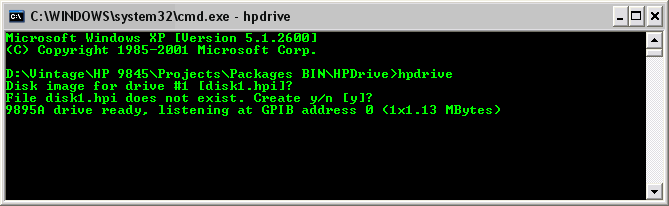
Sample Start of the HPDrive Emulator
If HPDrive has reported a compatible board, simply execute
hpdrive
without any parameters. If the board is suitable for mass storage emulation, HPDrive will ask for image files to be used as drive storage, create them if necessary, and then start emulating an HP 9895A floppy disk drive (this is the default). HPDrive normally operates silently and just reports if something didn't work as expected, however you can use the -d option to show drive activity (see options summary below).
If HPDrive can communicate with the board, but the board is not suitable for mass storage emulation, HPDrive will give you a note on this. In that case select another board suitable for mass storage emulation with the -board option (see the system requirements for a list of supported boards).
Please note that newly created images are always unformatted (just like a factory new disk drive). Use the appropriate formatting command on your host system (e.g. INITIALIZE) or the HPDir utility to create a file system before you can create files, list directories etc.
You can get an overview about all emulated HP drive types with
hpdrive -presets
If you need to emulate other drives than a 9895A, simply use the desired drive preset as command line option, like
hpdrive -9122
for emulating an HP 9122 SS/80 floppy disk drive.
Configuration
HPDrive can be widely configured with a larger number of command line options (see the following section for details). If you need a permanent change in configuration, you can provide a configuration file hpdrive.ini to HPDrive. When invoked, HPDrive first looks for this configuration file in the current directory, and then in the directory where the hpdrive.exe executable resides. If found, the settings in this file are applied. Since precedence of command line options ist higher than those of the configuration file, config file settings can still be overwritten by using command line options.
The configuration file is also useful for emulating HP-IB mass storage for which there is no built-in support by simply adding your own drive definitions in this file. Adding AMIGO drives is the easier task, since HPDrive needs only the most common parameters like AMIGO Identify response and drive geometry. Adding SS/80 or CS/80 drives is a bit more complicated, because the whole describe record has to be specified. Supposed you own a real SS/80 or CS/80 drive which you like to emulate, you can connect the original drive to your PC's GPIB interface and use the HPDir utility in combination with the -info option to query the describe record, which you can then paste into HPDrive's configuration file.
See the sample hpdrive.ini file provided with the HPDrive package for details on the configuration options available. HPDrive operates with a model which consists of I/O devices, which again may include one or more drives (hard disks, floppy disk drives or tape drives), all combined behind a single interface.
Currently the hpdrive.ini file consists of three sections, which can be in any order. In the [drives] section, the basic drive hardware can be defined, such as hard disks, floppy disks and tape drives, with a descriptive name and all of its parameters, such as high level interface protocol, disk geometry, volume count, interleave factor and so on. CS/80 drives in general require more parameters than AMIGO drives. The [devices] section defines the devices that interface to the host, each of which can contain one or more drives. Again a device is made up with a descriptive name and a number of parameters such as the AMIGO ID, communication parameters or the controller type. The parameters are followed by a list of drives which reference either the entries in the [drives] section, or any of the built-in drives. In a third section [defaults] several default parameters for HPDrive can be set, such as log level, GPIB address and many more, so you may save using command line options for them.
HPDrive already contains a large database of built-in device and drive configurations, which can be printed with
hpdrive -dumpdb
The parameters are output in the same syntax as used in the hpdrive.ini file, so you can just copy & paste and re-use as desired.
Example:
You can create a custom CS/80 device never produced by HP, holding a 55 MB 7945 hard disk, a 64 MB 9144 tape drive, and a 630K 9122 floppy disk, all accessable with one single GPIB address, but with different unit numbers:
Create a file hpdrive.ini with the content
[devices]
MYDRIVE = "HP7945 CS/80 55M hard + 64M tape drive + 630k floppy", 0x0220, CS80, 0x00, 0x8003, 1000, 1, 3, 7945, 9144-600, 9122
You now may emulate the new custom device with
hpdrive -MYDRIVE <hard disk image> <tape image> <floppy disk image>
and can use a hard disk, a tape drive and a floppy disk all with a single GPIB address.
In the same way you may tune emulation of hardware, e.g. increase the capacity of a hard drive. However, keep in mind that when changing the characteristics of real hardware, it might not match the expectations of HP's original drivers. If a driver is dynamically querying the device and drive characteristics, as it is possible with CS/80 and SS/80, it probably works fine. If a driver is using its own tables, it might fail matching the new parameters, which is especially critical for AMIGO drives.
Finally, emulation goes beyond what can be specified with parameters. Some drives are compatible with AMIGO, CS/80 or SS/80, but still have specialties in their behavior related to individual firmware. HPDrive tries to cover those specialties, as far as they are known. So it is not possible to achieve 100% emulation in every case simply by defining the configuration parameters.
Configuring for the HP 64000
By J. David Bryan
HPDrive can emulate a bus disk for the HP 64000 logic development system. It has been tested in both AMIGO and CS/80 emulation modes.
No additional HP 64000 hardware is required for HPDrive operation.
The specific drives supported on the 64000 varied with the revision of the operating system and the firmware installed in the station. In general, the following HP drives were supported:
- 9134A/B/XV (AMIGO)
- 7905/06/20/25 MAC (AMIGO)
- 7910 (AMIGO)
- 9134D/H/L (SS/80)
- 7908/11/12/14 (CS/80)
- 7941/45 (CS/80)
Firmware revision C must be installed in stations with serial prefixes 2125A and below to support the 7908/11/12/14 CS/80 drives, and revision D must be installed in stations with serial prefixes 2212A and below to support the 7941/45 CS/80 and 9134D/H SS/80 drives. Revision D was also required for internal floppy drive support, so if your station has floppies, then it should support CS/80 drives as well. Refer to the HP 64000 Logic Development System Selection and Configuration Guide for details.
For all drives except the 79XX MAC series, only one emulated drive is supported per host GPIB card. The 64000 operating system requires multiple bus drives to have different HP-IB addresses; HPDrive supports multiple drives as different unit numbers with the same HP-IB address. The MAC configuration supports from one to eight units per host card, although all emulated units must be the same drive type; mixing MAC drive types within the same HPDrive emulation is not supported.
The 64000 disk drivers have very tight timing requirements, so the -nosleep option is mandatory for correct HPDrive operation. In addition, logging is not recommended, as it may slow HPDrive down to the point that "Bus disk down" errors occur on the 64000 system. Concurrent host activity may also cause transient disk failures; generally, the 64000 will retry and recover automatically. HPDrive has been tested successfully with 400 MHz AMD K6 and Intel Pentium II host systems running Windows 2000; slower host hardware may not work.
Bus disk installation of the operating system and related software via floppy is supported. The emulated bus disk must be formatted with the 64000 System Disk Utility before installation, as described in the 64000 Installation and Configuration Reference Manual. An alternative is to copy an existing 64000 bus disk to a host PC image file using the HPDir utility and then to use that image file with HPDrive.
As an example, to emulate a 9134A drive at HP-IB address 0:
hpdrive -nosleep -9134A 9134A.hpi
To emulate three 7920 drives at HP-IB address 0:
hpdrive -nosleep -n 3 -7920 7920-unit-0.hpi 7920-unit-1.hpi 7920-unit-2.hpi
To emulate a 7914 drive at HP-IB address 1 (presuming the 64000 already has a bus disk at address 0):
hpdrive -nosleep -a 1 -7914 7914.hpi
Configuring for the HP 1000
By J. David Bryan
HPDrive can emulate a system or peripheral disk for the HP 1000 series of minicomputers. It has been tested on a 1000 M-Series running RTE-IVB and RTE-6/VM in both AMIGO and CS/80 emulation modes. It has not been tested on the 1000 A-Series.
The following HP 1000 hardware is required for HPDrive operation:
- An HP 1000 MEF-Series computer with the hardware options required for running RTE-IVB or RTE-6/VM (e.g., DMS).
- An HP 12821A Disk Interface and the associated card-to-HP-IB cable assembly.
- An HP 12992H ICD Disk Loader ROM or an HP 12992J CS/80 Disk Loader ROM (if HPDrive is to be used as the system disk).
RTE-IVB and RTE-6/VM support ICD (AMIGO) drives via driver DVA32, and RTE-6/VM supports CS/80 drives via driver DVM33.
For AMIGO emulation, HPDrive must be configured as a 7906H, 7920H, or 7925H ICD drive. For CS/80 emulation, HPDrive may be configured as any supported CS/80 drive. RTE system generation configuration and the list of supported drives appears in the RTE-IVB System Manager's Manual and the RTE-6/VM System Manager's Reference Manual. Supported CS/80 drives that are not natively provided by HPDrive may be added to the hpdrive.ini configuration file.
While the 12821A card allows up to four connected drives, only one emulated drive is supported per host GPIB card. RTE requires multiple drives on the same interface to have different HP-IB addresses, but HPDrive supports multiple drives as different unit numbers with the same HP-IB address.
For best performance, it is recommended that the -nosleep option be used to enable continuous polling. Otherwise, RTE disk performance will be poor.
As an example, to emulate a 7925H drive at HP-IB address 0:
hpdrive -nosleep -7925H 7925H.hpi
To emulate a 7914 drive at HP-IB address 1:
hpdrive -nosleep -a 1 -7914 7914.hpi
Using HPDrive
Generally, HPDrive is invoked within a console window from the directory where hpdrive.exe resides with the following syntax:
hpdrive [options][<image> ... ]
All other options are used to configure the emulated drive or for diagnostics. Below is a summary of all options. Execute HPDrive with the -h option for a summary. Also have a look into the README file for up-to-date information.
| Option | Description |
| -h | Output a summary of the command line options. |
| -d | Shows drive activity in terms of seek operations, including the affected records. Seek position refers to the current record address. There is one seek indicator for each unit. |
| -scan | Check for compatible IEEE488/GPIB interface hardware. Note that this option lists all interfaces, including those which work only with HPDir but not with HPDrive. |
| -<preset> | Select the drive type to be emulated by its preset name (like -9121 for emulating an HP 9121 floppy disk drive). Use hpdrive -presets to get an overview of all drive types currently emulated. |
| -a <address> | Use <address> as primary GPIB address. If omitted, the address defaults to 0. The possible address range is from 0 up to 30, however due to the parallel poll hold-off, only addresses from 0 to 7 should be used for mass storage devices. Address 21 is defacto reserved for the system controller. |
| -n <numdrives> | Use <numdrives> drives. Default for all drives is 1, however the number of emulated drives ca be freely chosen within the supported unit range (normally up to 4 units can be addressed by the HP 9845, however HPDrive allows up to 16 virtual units for AMIGO drives and up to 15 units for SS/80 or CS/80 drives). |
| -b <board> | In case more than one compatible IEEE488/GPIB board has been detected, a specific board can be selected with this option. <board> refers to the position at which the board is listed with the -scan option. Default is 0 (first board detected). |
| -lf <logfile> | Print all output into <logfile>. Useful especially for diagnostics in combination with the -l option. |
| -l <loglevel> | Specifies detail of HPDrive's reporting. Possible values are Note that logging may slow down GPIB response on low performance systems. If logging is required on those systems, use the -lf option above, since file writes in general are better buffered and as such faster than console output. |
| -e <eoi-delay> | Specify delay between sending the last data byte and asserting the EOI line (default value is 500). |
| -s <send-delay> | Specify delay between releasing hold-off and start sending in ms (default delay is 0). |
| -r <recv-delay> | Specify delay between releasing hold-off and start receiving in ms (default delay is 0). |
| -port <port> | Assign a certain I/O port instead of using autodetect (disables autodetect). |
| -nosleep | Disable idle cycles when waiting for GPIB commands or during GPIB data transfer. This option should be used only if the host requires tight timings with immediate response, such as the HP 64000 workstations. Normally, HPDrive sleeps in the range of few milliseconds between hardware polls in order to limit CPU usage. Using the -nosleep option may also speed up performance by an order of magnitude. |
| -strict | Enable full hold-off and error handling. Needed only in the (rare) cases where the host requires fully accurate emulation. |
| -rc | Enable remote control. With this setting, HPDrive can be controlled via a TCP/IP connection. Needed if user interaction is required (such as changing media or setting the format switch) without restarting HPDrive. |
| -rcport |
Select |
| -readonly | Switches all emulated drives into read only mode. Also protects the image against any changes* |
| -simh | Force using all image files as SIMH magtape image format file for all emulated drives. Issues an error if a disk drive shall be emulated. |
| -format | Pre-format SIMH magtape images. |
| -check | Load tape images with initial check of the image (tapes only)* |
| -nocheck | Skips SIMH tape image integrity check for using partially incorrect tape image files. |
| -nonblocking | Allow effectless data transfers between commands (new beta version only). Use this setting if the host insists on sending or receiving meaningless HPIB data between commands. |
| -dumpdb | Output internal device & drive database (new beta version only). Uses same format as the hpdrive.ini configuration file, and so can be also used to create such configuration file. |
| -vol <volume> | Use <volume> instead of default volume 0 for all units (new beta version only). |
| -v | Show version info. |
| -license | Show license info. |
*New in version 4.0 RC1
The HPDrive program can be shut down at any time by pressing CTRL-C.
Typically, you will simply mount an existing hpi disk image file with HPDrive like this
hpdrive <imagefile>
Now the PC behaves on the HP-IB/GPIB bus just like a 9895A floppy disk drive with one disk unit (which is the default) and can be used as such. You can now use the proper list directory command on your host to check the connection, e.g.
CAT ":H7"
on an HP 9845 with 98034 HP-IB interface configured to select code 7 ('H' is the drive type identifier for a 9895A floppy disk drive on a HP 9845).
If you like to emulate another drive, e.g. a 9122 floppy disk drive, first run
hpdrive -presets
for a listing of the devices and drives currently supported, and the keywords which select the drive type to be emulated. Now use the keyword for your selection with HPDrive, e.g.:
hpdrive -9122 <imagefile>
to mount <imagefile> for a 9122 emulation. Note that HPDrive expects a certain file size for the image to be mounted (which normally is drive specific) in order to provide the proper disk space. If the file size doesn't match, HPDrive gives you an appropriate message and you can chose whether to use the image file anyway, but will also adjust the drive parameters accordingly so that the emulation is no longer 1:1. In case of doubt, simply let HPDrive create the proper images for you.
Also note that - of course - your host must support the emulated drive type. So, for example, if you configure HPDrive to emulate a 9122 SS/80 floppy drive, an HP 9845 system will not be able to use it. It is just like connecting a real 9122 drive to the GPIB bus.
If you like to see some drive activity, add the -d parameter so you can trace the record number which is currently processed:
hpdrive -d -9122 <imagefile>
If you like to emulate multiple disk units, simply specify two or more image files. For example, if you like to emulate a 9895A drive with two units, enter
hpdrive <imagefile> <anotherimagefile>
You also can use the -n parameter for emulating up to 8 units, such as
hpdrive -n 3
which will first ask you for creating three disk images, and then start emulating three units with those images.
By default, HPDrive uses GPIB address 0. In case HPDrive should work on another address, use the -a option, such as
hpdrive -a 1 <imagefile>
for working on GPIB address 1. Note that most HP mass storage was limited to the address range of 0..7, so if you're using GPIB addresses above 7, it may happen that your drive is not detected by your host.
Combined Devices
One of the major improvements of the new beta version of HPDrive is support for CS/80 combined devices (so called combos) which include multiple drives of different type (e.g. hard disk and tape drive or hard and floppy disk drive) in one housing. This opens the possibility to emulate multiple drives with different characteristics in parallel with one single GPIB board. So full emulation of combo drives like the 7946 gets reality. For example running the OS from virtual hard disk and performing backups on virtual tape is now possible with one single GPIB board installed. You even can create your own combination of arbitrary CS/80 components in order to create your 'supercombo'.
There are already a number of predefined combos included in the built-in device table, which represent combined devices which actually do exist. The built-in device table can be customized in the config file.
Just as with the previous version of HPDrive, the drives are individually addressed as units within the same GPIB address.
Example
hpdrive -7946 image1.hpi image2.hpi
will emulate a 7946 disk/tape combo by using image1.hpi for hard disk emulation (unit 0) and image2.hpi for tape emulation (unit 1).
Restrictions
The number of given image files for devices with different drive types has to match the number of emulated drive units. If there are less image files than drive units, HPDrive will prompt for creating the missing image files interactively. The image files are associated to drive units in the order the drive units are defined for the selected device, and their size has to match the image size defined by the individual drive geometries. If the drive units in a device are all the same (and especially if there is only one drive unit associated in its definition), the number of units emulated still can be specified by the number of image files or by using the -n option.
Image files with extension .simh can only be used with tape drive units.
Multiple units are supported, but each unit with only a single volume. You however may specify the emulated volume id provided with the -vol parameter.
Emulating devices with multiple drive units with different types is restricted to CS/80 devices only and not possible with AMIGO devices or drives.
Config File
As mentioned above, in order to combine different drive units in one single device, drive units and devices have to be defined separately. For the built-in presets, the change is only visible when listing the built-in definitions with the -presets command, where devices and pre-defined drive units are now listed separately.
If you need to customize those definitions (e.g. in order to add devices) you also have to define them separately in the config file hpdrive.ini. Compared to the config file syntax of the previous version of HPDrive, for the new beta version there are now two separate sections, the [device] section and the [drive] section.
In the [drive] section, the characteristics of the individual drive units are defined, mainly the drive geometries and the mechanical data like access time etc. The drive name then is used as reference from the individual device definitions.
In the [device] section, drive definitions now can be combined to a device, holding at least one reference to any of the drives defined in the [drive] section and maximum 15 references to arbitrary drive definitions in total. Also, characteristics which are global to the device, such as AMIGO Identify response, maximum transfer rate or controller type are defined once for each device.
SIMH Magtape Image Support
The new beta version of HPDrive provides preliminary support for SIMH magtape image format. This addition had become necessary due to the fact that tape drives - in contrast to disk drives - store additional information on the tapes which might be of some importance to the user application. Practically, this goes back to the way computers used to work with 1/2" tapes, and includes delimiters in terms of end-of-file or end-of-tape markers, and the number of bytes actually written into a tape record. Also, again in contrast to disk drives, tape drives in general may use variable length records, include gaps without any data and in general provide sequential access rather than random access.
Beside disc drives with always fixed record length and magtapes with always variable record length there are also hybrids such as the CS/80 tape drives using tape cartridges. Those drives can be operated in two different modes: a normal mode, which uses the full payload of every tape block of normally 1024 bytes (which is quite similar to disk storage), and a special, more magtape like mode, where records with variable length up to the block size plus file marks are supported (mostly for easier use with systems which normally use magtape drives such as the HP 1000). Although rarely used, tape cartridges recorded with that special mode cannot be completely preserved and emulated with the hpi image format (which does not support storing file marks or variable length records). However the SIMH magtape format fills that gap, so that also this kind of cartridge tapes can be preserved as images and become fully emulated.
SIMH Magtape Image Format
Now for most applications the specialties mentioned above are not really required by a user application, so that the disk scheme can be easily adopted for tape drive emulation. This is especially true for unified mass storage implementations like that of the HP 9845 which treat tape storage in a similar way like disk storage. But some systems like the HP 21xx or the HP 1000 in fact make use of file marks and other features and therefore may fail with the previous implementation of HPDrive.
Instead of defining a new image format on my own for incorporating all this information, I decided to use a standardized format which already supports the features required for full tape emulation. The SIMH magtape format originally has been created for the SIMH Computer History Simulation system, which covers emulation of a growing number of different historic computer systems, including early HP computer systems such as the 2116 or the 2100 mini computers. SIMH development is currently coordinated by Bob Supnik. The home site can be accessed via simh.trailing-edge.com.
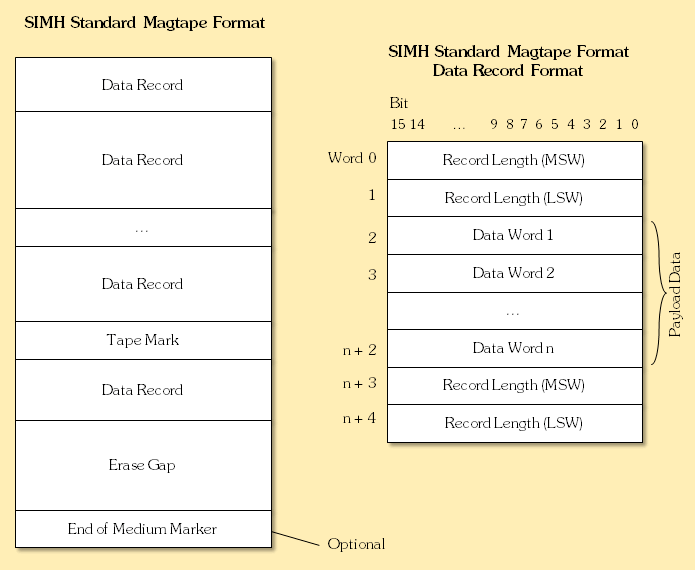
As with most emulators, the SIMH concept also needs a representation for mass storage data, which is represented by the SIMH magtape image format as described in a special document also available from the SIMH home site (use this direct link for download). Although the image format is somewhat hard to implement, there is at least a sample implementation available which covers some basic functionality and also clarifies some details of the specification.
SIMH Magtape Format for CS/80 Emulation
Since the HPDrive emulator is dedicated to HP-IB peripheral equipment, tape drives supported by HPDrive all comply either to the AMIGO or to the CS/80 command specification. Whereas SIMH magtape format in general allows variable length records, CS/80 normally requires all records having the same length of - in general - 1024 bytes (we call it here the "defined record length"). As a consequence, on one side not every SIMH magtape image can be used with a CS/80 tape drive (at least not without some kind of conversion) and on the other side direct tape positioning to a certain record is possible for CS/80 tape drive emulation without sequential forewinding or rewinding the tape which again may speed up tape access significantly.
Now actually the CS/80 standard defines a special mode for CS/80 drives, which provides support for both tape marks (called file marks within the C/80 specification) and variable length records (implemented with a so-called character count feature). Character count is switched off by default on the CS/80 tape device and has to be enabled by command. Note that still the limitation of the fixed block size is in effect for a CS/80 tape drive, which cannot be exceed by the variable record length. So the record length can be any value between 0 and the defined record length.
So some kind of subset of the SIMH magtape image format has to be defined in order to use the SIMH magtape image format for emulating CS/80 tape drives, denoting all required restrictions for reliable tape operation. Therefore all CS/80 style SIMH magtape images can be used with any SIMH emulator (since they all comply to the SIMH magtape specification), but SIMH magtape images have to obey some restrictions in order to be run in a CS/80 emulation:
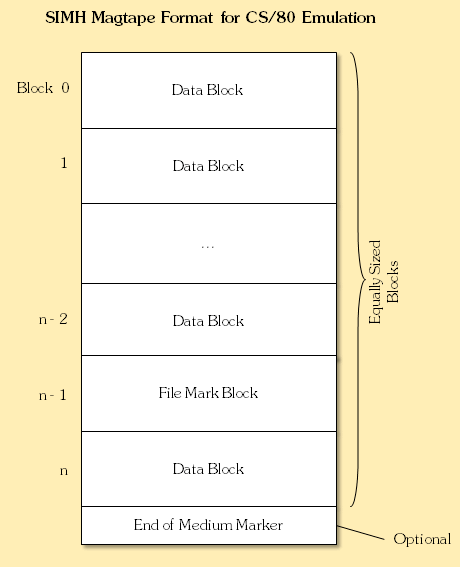
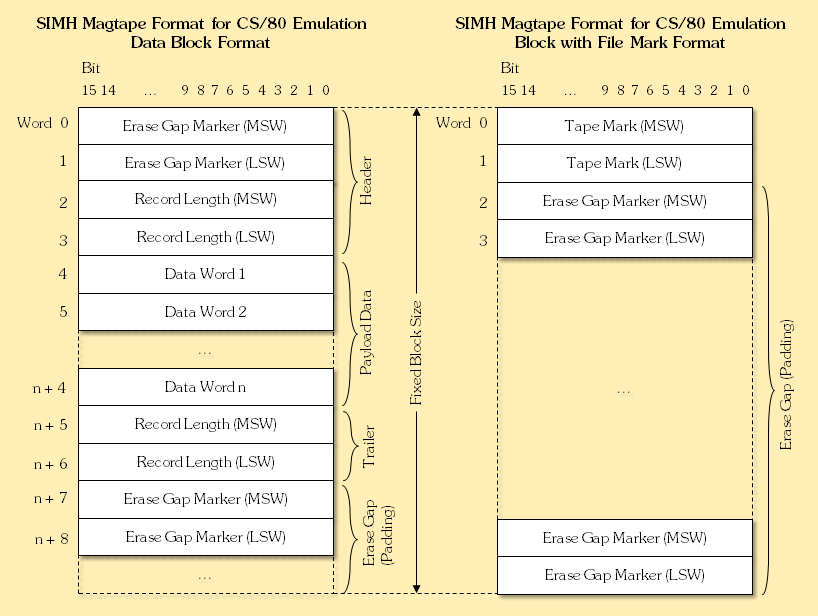
- Each record is represented by a single fixed size data block of CS/80 defined record length plus 16 bytes.
- A SIMH magtape image for CS/80 emulation is made up by a sequence of those equally sized data blocks up to the maximum number of records supported by the selected tape medium.
- Each data block consists of 4 byte leading marker (either erase gap marker or tape mark), payload container and padding.
- Each payload container consists of the payload data bytes (the actual record), framed by identical leading and trailing record length descriptors of 4 bytes each. In case the number of payload data bytes is odd, the data bytes are padded with an extra dummy byte to ensure the trailing record length marker is aligned to an even byte position.
- The remaining space between the trailing record length descriptor and the end of the block is padded with erase gap markers, resulting in at least one 4 byte erase gap marker at the end of the data block. In case the padded space is not a multiple of four, the first erase gap marker after the payload container is a half gap marker.
- Erase gaps are only allowed in the first 4 bytes of a data block or as padding between the end of the payload container and the end of the data block, so erase gaps between data blocks are not permitted.
- The end of the tape can be either defined explicitely by an EOM marker immediately following a data block, or implicitly by the end of the image file.
The CS/80 defined record length corresponds to the genuine record byte length of the CS/80 tape device (usually 1024 bytes) and must be a multiple of four.
Briefly, a SIMH magtape image for CS/80 emulation consists of fixed size data blocks of CS/80 defined record size plus 16 bytes, which allows fast hashed record access. CS/80 file marks are implemented by using a SIMH tape marker at the data block start instead of a leading erase gap marker. CS/80 character count is implemented using the SIMH record length descriptors.
Note that it is not possible to write records with zero length with SIMH format, since a leading record length field for a zero size record would be interpreted as a tape mark. This also applies to SIMH magtape image for CS/80 emulation. It is not possible to write zero length records to CS/80 tapes anyway, since a Locate And Write with zero length is defined as a locate only (seek) command and nothing gets written.
Also note that data contained in records marked with file mark in fact can't be read any more by a Locate and Read command (EOF will be returned when reading the file mark and the address pointer will point to the next record), and there is no way to remove CS/80 file marks except re-initializing the full medium. Further, real CS/80 cartridge tapes do not use end-of-medium markers. Every cartridge tape always provides a defined number of pre-formatted fixed-size records (e.g. 16,352 records for 150 ft. cartridges and 65,408 records for 600 ft. cartridges with 9144 drives).
SIMH magtape image files used for CS/80 emulation should be identified by the file name extension .simh (in order to distinguish them from standard .hpi image files). This is also the standard file name extension used by HPDrive when creating new SIMH magtape images. For convenience, HPDrive also uses the .tape file name extension to identify SIMH format because many existing SIMH tapes use that file name extension, but I'd recommend .simh for avoiding ambiguity.
Emulating non-CS/80 Magnetic Tape Drives
Once the SIMH format has been implemented, it would be at least partially wasted without also implementing support for HP's non-CS/80 magnetic tape drives as far as those drives can be accessed via HP-IB. This is true for HP's 79xx series of magnetic tape drives, which are controlled by a special tape command set based on the AMIGO protocol. For the time being, the new HPDrive beta version provides some preliminary support for the 7970E, 7974, 7976, 7978 and 7979 drives. Using the SIMH format is mandatory for those devices, since they rely on variable length records, which again is provided by the SIMH magtape format only. With the 7970E tape drive, a maximum of four magtape units can be emulated in parallel.
See this link for downloading the HP 7970E Opt. 826 Programming Manual for the HP 9845.
Creating SIMH Magtape Images for Emulation
SIMH magtape images for emulation will be automatically created by HPDrive if you select a 79xx tape drive or use the -simh option with one of the CS/80 tape drives and specifiy no image file or an image file which does not yet exist. Alternatively, it asks for creating a new SIMH image file when a non-existing filename with .simh extension is specified.
The new image file for 79xx drives will be empty, whereas the new image for CS/80 tape drives will be formatted by setting all record length descriptors to the defined CS/80 record length (for tapes in general 1024 bytes) and filling all payload data with zeros.
Another, more sophisticated way is to use the SIMHtool provided in the Utilities Section. It can be used also to create a SIMH magtape image from an existing hpi image file or to ceate an unformatted SIMH magtape image (where no records are defined yet or all records have an initial length of zero).
Conversion
Whereas every SIMH magtape image file for CS/80 emulation is always a valid SIMH magtape image and therefore can be used with any other SIMH emulation, it might be necessary to transform an existing SIMH magtape image, which does not yet comply to the CS/80 emulation rules, to an image file which can be used for CS/80 emulation.
This can in be done in two ways:
- All records included in the original SIMH magtape image are transferred into fixed size data blocks retaining the original record size. Records exceeding the CS/80 defined record length will be distributed among more than one data block. Advantage of this method is that the original record length information will be preserved, at least as long as the CS/80 defined record size is not exceeded. However, in case the original image contains many small records, lots of space will be wasted by leaving the remaining CS/80 defined record size unused.
- Alternatively, the payload data of the SIMH magtape image is flattened and all data is distributed equally among the new fixed size data blocks, which results in most efficient data packing but also losing the record structure of the original image.
Which method should be applied depends on the nature of the data. In general, in case the original record structure is of importance, the first method should be used, and the second method otherwise. The original file structure will be preserved in any case.
Another conversion might be necessary for transferring hpi binary image files to SIMH magtape image files and vice versa. Although this transformation is straight-forward, it has to be taken into account that hpi image files do not include any record size, file marker or gap information, so this information will get lost during conversion from SIMH magtape images to hpi images. Also, record size information has to be specified by the user when converting hpi images to valid SIMH magtape images.
Conversion can be done using the SIMHtool provided in the Utilities Section.
SIMH Image File Checking and Inspection
If you want to use an existing SIMH magtape image, but you don't know whether it already complies to the rules for CS/80 emulation, or you want to check whether the image file is error-free, or you need to know the internal record structure, or you want to extract data from individual records, you can use the SIMHtool provided in the Utilities Section for this. Please follow the instructions in that section for usage. Some other SIMH tools are available via this direct link.
Using SIMH Magtape Images with HPDrive
Of course, using SIMH magtape images makes sense only with the emulation of tape drives, not with disk drives. Currently, the emulation of 79xx series of magnetic tape drives is supported by HPDrive as well as the C1511A DDS DAT drive and the 9144A and 9155A CS/80 tape drives, the latter with either DC150 or DC600 tape media. Using SIMH magtape images with the emulation of any other drive will be rejected.
HPDrive uses SIMH magtape image mode automatically if an image file with extension .simh is supplied or one of the supported magtape drives is selected for emulation. This is the preferred way. HPDrive can also be switched manually to SIMH image mode for all emulated drives with the -simh option (right now will give an error when used with a disk drive). If the file specified does not yet exist, it will be created by HPDrive and formatted appropriately.
So a valid command for emulating a 9144A with DC150 tape cartridge and SIMH support would be
hpdrive -9144-150 myimage.simh
(where SIMH mode is switched on by .simh extension) or, alternatively
hpdrive -9144-150 -simh myimage
for arbitrary file names. Note that for proper emulation of CS/80 tape drives with the SIMH magtape format, the tape image file must conform to the restricted rules for CS/80 tape drive emulation (see section "SIMH Magtape Format for CS/80 Emulation" above). It is in general not possible to use arbitrary SIMH tape image files for emulating a CS/80 tape drive.
On start-up, HPDrive does a quick check on the SIMH magtape image to assure that the image file does not contain errors and matches the right format for the selected emulation, and then starts emulating the selected tape drive. The check can be disabled for a known good tape with the -nocheck option, which can speed up the start of an emulation especially on a large tape significantly. You can disable tape image checking completely by setting the nocheck = true option within the defaults section of the hpdrive.ini file.
Notes:
- Support for SIMH magtape images is restricted to tape drives only. The SIMH magtape image format makes no sense at all for disk drives.
- In contrast to CS/80 tapes with their 150 ft. or 600 ft. pre-formatted cartridges, there is no default image file size for magtapes. So, a SIMH image file representing an empty tape will just hold the end-of-media (EOM) marker. Any write to the tape will then increase the image file size as required. Actually, HPDrive does not force CS/80 tape images to be exactly 150 ft. or 600 ft. anyway (actual tape length is determined at mount time).
- Depending on the tape structure, emulation of magtapes can be way slower than that of disk drives. HPDrive behaves just like a real tape drive in sequentially moving forth and back within the SIMH image file, and does lots of marker processing. Because of the variable length record structure there is no way for hashed access to certain tape positions. Moreover, there is no "streaming" transfer mode for tape data over HPIB, so that each tape record has to be processed with lots of handshaking on HPIB level. If many small records have to be processed, this slows down transfers significantly compared to disk transfers.
Remote Control
Normally it is ok configuring HPDrive's action when launching HPDrive, e.g. specify which image file shall be mounted. Running HPDrive actually is like powering on the emulated device. However real drives in general also provide controls for the operator to change things after power-up. Examples are changing reels on a magnetic tape drive or media on a floppy disk drive, putting the drive online or offline, or enabling write protection. Also for diagnostic purposes it can be quite useful to query the drive's status or to trigger certain events such as resetting or clearing the drive's status without restarting HPDrive and without controller interaction. This is especially useful for passing the comprehensive HP 1000 and HP 3000 diagnostics where operator interaction is part of the tests.
The new beta version of HPDrive provides an interface to talk to HPDrive from an operator's side during emulation. This remote control interface is disabled by default but can be enabled with the -rc command line option. HPDrive then listens by default on port 10042 on a TCP/IP connection for remote control commands. Currently there is another utility program called hpdriverc.exe which can be used to send remote commands to HPDrive and query cetain run time information from HPDrive. Because TCP/IP is used for talking to HPDrive, hpdriverc.exe can run on a separate computer, as long as the PC where HPDrive runs and the PC where hpdriverc.exe runs are connected via network.
Note that it may be possible that when running local firewalls, either system can complain that there is an unknown application (hpdrive.exe or hpdriverc.exe) which tries to establish a connection via TCP. You may need to configure your local firewall to allow this communication. In order not to get annoying warnings for those who do not want to use the RC connection but run a local firewall, the RC feature is disabled by default.
Also note that the emulated drive type must be selected when starting HPDrive. You cannot change the drive type remotely.
Usage of hpdriverc.exe is
hpdriverc [<options>] <command> [<host>[:<port>]]
with <host> is the hoste name where HPDrive is running on (which is normally assumed as the local host), and <port> specifies the TCP port where HPDrive is listening (which is port 10042 by default).
The current beta version of HPDrive supports the following commands and options used with hpdriverc.exe:
| Command | Description |
| -h | Output a summary of the command line options. |
| -address <addr> | Change GPIB address to <addr>. |
| -clear | Perform a soft reset (controller & drives). |
| -format on|off | Enable/disable formatting for unit. |
| -help | Output command summary. |
| -info | Output general information on the emulated device. Currently that information includes which device and which drive(s) are emulated, the device ID, the GPIB address, the currently selected unit and which image file is mounted for the selected unit. |
| -load <file> | Load unit with image <file>. Automatically unloads the current medium before mounting the new one. <file> must be already present on the system where HPDrive ist running. |
| -offline | Set unit offline. |
| -online | Set unit online. |
| -ping | Verify connection to RC server. Used for diagnostic purposes to check that HPDrive can be accessed. |
| -position | Show current record position for all drives. |
| -protect on|off | Set write protection on or off. |
| -reset | Reset controller only. No reset is being performed on the connected drives. |
| -restart | Perform a power-on reset. So the controller and all emulated drives will be brought into power-on condition. |
| -rewind | Position at start of medium (record 0 for disks or BOT for tapes). |
| -select | Select unit. Use in combination with -unit option to select other units but unit 0. |
| -shutdown | Shutdown remote server. HPDrive will exit and no longer respond to remote commands. |
| -status | Output device/drive/unit status in hex format. The number of returned status bytes depends on the emulated drive type. |
| -swap <unit> | Swap unit number 0 with <unit> (i.e. the drive accessible under the unit 0 afterwards will be accesible under <unit>, wheres the drive formerly accessible under <unit> becomes the new unit 0). Use in combination with -unit option to swap other units but unit 0. |
| -unload | Unload/eject medium. Use -load to load another medium. |
| -v | Show version info. |
| -license | Show license info. |
| Options | Description |
| -unit <unit> | Specify the unit which shall be targeted by any of the above commands. Does NOT select a unit (see -select command above). |
Examples
Before any of the commands can be sent, HPDrive has to be started with RC enabled, for example by
hpdrive -rc test.hpi
which starts the emulation of a HP 9895A floppy drive with RC enabled.
Now check the connection between hpdriverc.exe and HPDrive by running
hpdriverc -ping
If hpdriverc.exe can talk to HPDrive, it will output the message
Command PING returned result 00 (OK)
if no connection can be made, hpdriverc.exe outputs an error message such as
Could not connect to host "127.0.0.1" at port 10042
By default, hpdriverc.exe assumes that HPDrive is running the same machine. If HPDrive is running somewhere else, for example on the host "emulator" add the host name when executing hpdriverc.exe, such as
hpdriverc -ping emulator
If you need to know more about the current emulation, execute
hpdriverc -info
which gives you a summary on how HPDrive is currently configured, for example
175 info bytes received:
device="HP9895A 8" 1.15M AMIGO floppy drive"
unit="HP9895A 8" 1.15M AMIGO floppy drive"
id=0081
GPIB address=0
1 unit(s) connected
unit 0 selected
image "test.hpi" mounted
Now you can query the emulated drive's current status with
hpdriverc -status
which returns a number of status bytes in hex format depending on the emulated drive type, just as if the AMIGO Send Status command has been sent to the drive by a host.
if you need to change media without restarting HPDrive, and you plan to mount another image file test2.hpi, you can do so by
hpdriverc -load test2.hpi
Please note that the image file is assumed to already exist on the same machine where HPDrive is running. There is no image file transferred by hpdriverc.exe to HPDrive.
Some commands require to define which unit is affected. This can be done with the -unit option. So if you have started HPDrive with at least two units and you need to change media for e.g. unit 1 without restarting HPDrive, and you plan to mount another image file test2.hpi, you can do so by
hpdriverc -unit 1 -load test2.hpi
You cannot address more units than currently available (i.e. add more units to the emulation).
Downloads
Click here for downloading HPDrive:
| HPDrive 4.0 RC1 Windows 9x/ME/NT/2000/XP/Vista/Windows7/8/10/11 (new): | hpdrive-40rc1-bin-windows.zip |
| HPDrive 4.0 RC1 for 32-bit and 64-bit Linux (new): | hpdrive-40rc1-bin-linux.tgz |
| Custom TNT4882/TNT5004 Driver 3.2 for 32-bit and 64-bit Windows XP/Vista/Windows7/8/10/11 (new): | gpibdrv-32.zip |
| Custom PCMCIA GPIB/GPIB+ Driver 1.0 for 32-bit and 64-bit Windows Windows7/8/10: | pcmcia-gpib-10.zip |
| Custom PortIO Driver 1.0 for 32-bit Windows 2000/XP/Vista/Win7: | portiodrv-10.zip |
The 4.0 RC1 version has been checked on many platforms, however please take into account that thoroughly testing twenty drive types or more under ten or more platforms with five or six different GPIB boards is not feasible. It is recommended to make copies of valuable images you are working on in case something goes wrong, just like it is good practice with real hardware. Please use the contact feature to let me know if something doesn't work as expected.
The PCMCIA driver needs a special version of HPDir and HPDrive which is still under testing. Please use the contact feature and leave me a message if you like to try it.
Click here for access to the old HPDrive versions:
| HPDrive 4.0 beta7 Windows 9x/ME/NT/2000/XP/Vista/Win7/Win8: | hpdrive-40beta7.zip |
| HPDrive 3.01 Windows 9x/ME/NT/2000/XP/Vista/Win7 (last stable release): | hpdrive-301.zip |
| HPDrive 2.0 beta2 Windows 9x/ME/NT/2000/XP/Vista/Win7: | hpdrive-20beta2.zip |
| Custom TNT4882/TNT5004 Driver 2.0 for Windows XP/Vista/Win7: | gpibdrv-20.zip |
| Custom TNT4882 Driver 1.0 beta Windows XP/Vista: | gpibdrv-10beta.zip |
For running ISA based GPIB boards under Windows NT/2000/XP/Vista/Win7 all my software also supports the DriverLINX DlPortIO driver package can be downloaded here. Since the current status of DLPortIO is not quite clear (the original distribution channel has been closed), and in fact it is better to have some control on what is happening below the surface, I wrote my own custom PortIO driver customized to the needs of my own software, which is totally free of use.
Please note that, although non-commercial use is still provided free of charge and distribution is encouraged within the Creative Commons Public License, HPDrive is not free software. If you plan to use HPDrive within a commercial context, please use the contact feature to ask for commercial conditions.
The change in licensing has become necessary in order to provide a minimum of protection towards existing offers of other commercial solution vendors, since due to the support of contemporary GPIB hardware the functionality of HPDrive and HPDir is no longer restricted to pure vintage technology.
Working with Binary Images
The image files which are used by HPDrive can be accessed by another utility, the HPDir program. If you consider HPDrive as a utility which works on drive level, HPDir is the program which works on file system level. Besides copying files to and from an image file, HPDir supports a number of other operations on images, like creating and initializing images, generating directory listings, creating and deleting different types of files inside an image, setting file attributes and much more. See the HPDir Project for information on this really versatile and useful program.
In particular, you can use HPDir to copy the content of a floppy or hard disk into an image file and vice versa for use with HPDrive. Image files used with HPDrive are compatible with those produced by many other image utilities, including the dd UNIX command. If you need use a Teledisk TD0 image with HPDrive, you first have to convert it to the HPDrive hpi image format using the TD2HPI utility. See the 9845 Utilities Section for Ima2hpi/TD2HPI.
If you are looking for software to test HPDrive with, please have a look into the Software Section. There is much software available, mostly provided as image files for direct use with HPDrive's HP 9895A emulation.
FAQ
| Question | Answer |
| What do I need to get HPDrive working? | You need one of the supported HPIB/GPIB interface boards and any Windows starting with Windows 95 (for ISA boards) or Windows XP (PCI boards, PCMCIA boards) or Linux (ISA Boards). |
| What is the least cost solution? | Old PC with at least one ISA slot, supported GPIB ISA card, Linux. |
| Are there any disadvantages with that least cost solution? | No. |
| Wouldn't it be much easier to create a small microcontroller solution? | Yes and no, both have their advantages. Almost for every home computer there is a suitable solution which emulates mass storage devices by using flash memory or bridging to standard IDE or even SATA drives. Of course you don't need a PC for this, and current flash memory provides more than enough space for emulating any type of vintage mass storage. And you can attach the flash memory to your PC to read them or write them as you like... ooops, did I mention the word "PC"? Ok, it would be really convenient to have a reliable flash memory solution, and I would personally use it every time I don't have a PC at hand. There are microcontroller based solutions which look very promising to me, and am supporting some of them with my own knowledge and experience. Don't expect a microcontroller based solution to be cheaper than a used ISA GPIB board, but you can save the Linux or Windows PC, which is not necessarily required any more. See Anders Gustafsson's design as an example (also available at elektor labs). Bridging e.g. to IDE must not be restricted on HP-IB, in principle any of HP's disk interfaces can be 'bridged'. However without emulating real drives there will be the need to create suitable drivers on the host side. See Terry Newton/Bob Shannon's approach as an example for 21XX computers. Also there are great solutions around, which provide you with a full hardware replacement of the original drives with internal standard IDE or SCSI hard disks, unless you are not expecting them to be given away for free. The main advantage of using a standard industry GPIB controller lies in the fact, that those boards have been thoroughly designed to be 100% compatible with HP-IB/GPIB. Another advantage of PC based emulations like HPDrive is that they are quite convenient to use (e.g. for debugging). Advantage of a microcontroller based solution is that you don't need a PC at hand for simulating vintage HP mass storage, and because the microcontroller runs in a deterministic way (in contrast to an emulation running in a multi tasking environment like Linux or Windows) implementation is somewhat easier. |
| Is there support for 64-bit versions of Windows? | Yes, there are new 64-bit PCI and PCMCIA drivers for Windows 7/8/10 which seem to work pretty well. Please note that these drivers are not signed by a trusted certificate, so you need to switch 64-bit Windows into test signing mode before installing and using them. |
| Does the custom TNT4882/TNT5004 driver support PCIe (PCI Express) devices? | In principle, PCIe versions of the NI GPIB boards are supported, but not all of the PCI device codes are known. In case the provided driver won't work with your card, please use the contact feature to give me the PCI device code of your PCIe board, and I'll try to include support for it. |
| Does HPDrive work with USB interfaces? | No, it generally won't work with USB solutions. The only exceptions are the Keithley/CEC solution with driver version 8.3. The reason is twofold, on one side, USB solutions are in general too expensive that I can afford them for development and testing, and if I would have them, it is not sure that I get them fully reverse engineered because none of them has been documented for third party developers. |
| Does HPDrive work with PCMCIA interfaces? | Yes, PCMCIA cards from National Instruments are supported with a special driver I needed to write for them. |
| Does HPDrive work with vintage HP hardware other than an HP9845? | Yes, of course it does, the HP9845 once had been the original target. Nowadays HPDrive has been tested with many systems, including Series 80, Series 200, Series 300, HP64000, HP1000 and HP3000. |
| How accurate is the emulation? | Not 100%, but good enough for most applications. The controller of a real drive works in a deterministic way, i.e. response times are always the same, except when data is being transferred from or to a medium. HPDrive runs under Windows and Linux, which both are no real time operating system, and there is no way to guarantee exact match with the timings of a real drive. Also some functions which are very rarely used or which are not documented (and therefore unknown concerning their exact behavior) may not be emulated by HPDrive. In order not to create too many problems during operation, HPDrive normally is quite tolerant and forgives many misbehaviors of a host. However in some situations, a rather strict handling of any forbidden action is required. In that case please use the -strict option with HPDrive. |
| Do I need to install special drivers for HPDrive? | Depends on your setup. For ISA based GPIB boards under Windows 9x/ME, no special driver is required. For ISA based GPIB boards under Windows 2000 up to Windows 7 either my own PortIO driver or the DriverLynx PortIO driver has to be installed. For PCI based GPIB boards from National Instruments under Windows 2000 and later, my so-called "custom TNT4882/TNT5004 driver" must be installed instead of the original manufacturer's driver. Same applies to the custom PCMCIA GPIB/GPIB+ driver for NI PCMCIA cards. For PCI boards or USB solutions from Keithley/CEC the original manufacturer's driver version 8.3 must be installed. ISA boards under Linux need no drivers. PCI boards need the open source Linux GPIB package being installed. |
| Can I use the original GPIB board driver with HPDrive? | Only for Keithley/CEC boards. For ISA boards, any original driver can be installed in parallel, but will not be used by HPDrive. For PCI boards from National Instruments, my own PCI "custom TNT4882/TNT5004 driver" must be assigned instead of the original NI driver. Same applies to NI's PCMCIA cards with the custom PCMCIA-GPIB/GPIB+ driver. When using multiple PCI GPIB baords in the same machine, in theory it is possible to use one board with the original driver, and the other with the custom TNT4882/TNT5004 driver. |
| Why are some GPIB boards supported by HPDir but not by HPDrive? | Emulation of HP mass storage devices requires a hack which is not available with any GPIB hardware other than those running in µPD7210 mode. This especially prevents HPDrive working with TI9914 based solutions, even if they are from HP. |
| Why does HPDrive require expensive GPIB interface boards? Are there no cheaper solutions? | HP-IB/GPIB is a complex technology. If you are using an industry solution for connecting to the HP-IB/GPIB bus, you are on the secure side, since the hardware is proved and mature, and you in most cases have no trouble with compatibility on the bus level. In order to offer (relatively) cheap solutions, HPDrive also supports ISA boards, as long as they have a µPD7210 or NI custom chips installed or provide a µPD7210 compatible mode. Used ISA GPIB boards are still easy to acquire (e.g. via eBay) in the range from USD 10 up to USD 30. The only drawback is that you also need a PC providing at least one ISA slot. You may use both Linux and Windows with such a PC. Since PCs with ISA slots in general won't run Windows versions newer than Windows XP, HPDrive supports ISA based GPIB interfaces also for Windows 9x/ME. There exist promising experimental microcontroller (AVR, PIC etc.) based GPIB solutions, however the tight timing requirements on several GPIB activities are a limiting factor. For the time being, only industry GPIB solutions seem to be suitable for reliable emulation of all mass storage features. |
| Are there any advantages/ disadvantages using an ISA vs. PCI or PCMCIA based GPIB board? |
If you want to use a modern PC, you have no choice and must use a PCI/PCIe board, since ISA and even PCMCIA represents former technology. Even PCI is not standard any more and recent mainboards may lack the suitable expansion slots. In general, PCI/PCIe and PCMCIA boards provide the better overall performance. With ISA boards you can keep the original manufacturer's drivers installed, which is not possible with PCI or PCMCIA hardware from National Instruments. Functionally, there is no difference. For ISA boards you achieve best performance with a GPIB solution which implements a FIFO (e.g. TNT4882 based boards like the AT-GPIB TNT). |
| Why does hpdrive -scan report GPIB boards, which are later refused as "not suitable for mass storage emulation" | HPDir and HPDrive share the same code for detecting GPIB boards. At this point, the output of hpdrive -scan may be misleading and I will change this in one of the future revisions. |
| Is it possible to use more than one GPIB board with HPDrive in one system? | In general, yes. As each instance of HPDrive can be bound only to a single GPIB board, you simply start multiple instances of HPDrive, one for each GPIB board with the -board option set to the selected interface (use hpdrive -scan to identify the board numbers as HPDrive uses to select to right hardware). Note that you should not use the -nosleep option with multiple instances of HPDrive, as this may lead to unbalanced performance on these instances. |
| Why does HPDrive work great with attached mass storage, however booting from mass storage is not as reliable? | Hosts in general use different mass storage drivers for bootstrapping and during normal operation. Boot loader code implements in many cases the absolute minimum required for bootstrapping far away from any standard, which in some cases makes bootstrapping a delicate issue. Once a boot procedure is fully completed, better coded and more complete "certified" drivers have been loaded and do the job much better than the simple bootstrap code. |
| Is it possible for HPDrive to emulate multiple mass storage devices at once? | Yes, it is. However HPDrive can only handle one single primary HP-IB/GPIB address. If all devices are of the same type, tell HPDrive to emulate multiple "units" with the -n option. If the emulation shall provide different types (e.g. hard disk plus floppy) use CS/80 "combo" emulation, which can combine different device types with access through one single primary address. |
| Does HPDrive support the emulation of tape drives? | Yes, both CS/80 tape drives and HP magtapes such as the 7970E are supported. Note that full emulation of tapes with tape marks and variable length records needs usage of the SIMH image format instead of hpi. |
| Does HPDrive support the emulation of CD-ROM drives? | As far as I know, there was just one single CD-ROM drive which could be connected via HP-IB, the 600/A (C1707A). In order to simplify compatibility, this drives mimics a 7935 hard drive in read-only mode. Special CD-ROM features like security and audio were added via CS/80 utilities. Unfortunately I don't have the exact drive data with ID code for a 7935, also the details for the special CS/80 CD-ROM utilities are unknown, so there is currently no emulation for CD-ROM. In some cases it is possible to transfer the content of a CD-ROM image from ISO 9660 to LIF and then use one of the existing emulations to access the data. |
| Can I configure my own drives which are not yet supported by HPDrive? | Yes, you can. Simply use the configuration file option by defining your own generic drives in a file named hpdrive.ini. This also includes capacity parameters (in theory you might create CS/80 drives with up to 248 blocks of up to 65536 bytes each...). Unfortunately some original mass storage devices have a special behavior which cannot be fully configured just with a couple of parameters, so these drives need some hard coding for full emulation. In most cases however the custom configurations will work fine. |
| What is the hpi image file format? | hpi is the simplest possible format providing the raw binary data of all sectors or records in the proper order as the operating system sees them, as it is e.g. produced by the UNIX dd command. This is best suitable for HP's unified mass storage concept. hpi does not contain any header or meta information, so there is nothing magic with this format. Many disk utilities are using the same format but with different file name extensions such as .bin, .dat or .img. The .hpi file name extensions is a hint that the content is intended for HP mass storage devices. Drive geometry is added by the characteristics of the emulated device and of no relevance for the hpi file, except that the size of the hpi file should be a multiple of the record size (usuallly 256 bytes), track size etc. |
| Does the size of an hpi image file have to match the media size of the emulated device? | No, HPDrive automatically adjusts the drive geometry to the size of the provided image file. However, since accurate emulation should use the normal drive geometry, HPDrive prints a warning if the size of the image file does not exactly match the expected media size, because if the host is not aware of the non-standard drive parameters (e.g. by actively quering the parameters), operation may lead to inconsistencies and data corruption. Note that in general there are multiple valid interpretations on the number of records or tracks, depending on whether spare records or tracks are counted or not. |
| What is the SIMH magtape file format? | The SIMH magtape format has been defined for the preservation of magnetic tapes (in contrast to spooler tapes or disk drives) and stores any kind of tape characteristics (including erased areas, tape marker/file marker and record size). For proper emulation of magtapes this format should be used instead of hpi. SIMH magtape format is strictly sequential, and therefore not suitable for disk storage emulation. |
| Can I change media without restarting HPDrive? | Yes, you can use a small command line utility to remotely control a running HPDrive (see remote control section above). HPDrive itself has no graphical user interface for controls e.g. for changing media, setting the drive online or offline etc. HPDrive must be started with the -rc option for providing an interface for remote control. |
| My firewall complains about HPDrive -rc or HPDriverc | The remote connection between HPDriverc and HPDrive works over a TCP/IP connection via port 10042. A properly configured firewall should detect and report this kind of connection in order to prevent malicious software to create unwanted connections over the internet. Configure your firewall to allow HPDrive and HPDriverc to use TCP port 10042 (or whichever port you have specified by -rcport). |
| Why does HPDrive not provide a graphical user interface? | There is no special reason, it is just that the command line version does the job. From my personal point of view, graphical user interfaces are nice for usability, but have not much relevance in terms of functionality, and honestly I am not the GUI guru with Visual Studio and the like (some of my projects actually have a GUI, e.g. the tablet emulator). Since I am personally more a friend of command line operation and gcc, I prefer spending the development time rather in functionality than in GUIs. |
| What is it with AMIGO, CS/80 or SS/80? | HP-IB/GPIB is mainly a communication channel, but (at least at the time when it was in use for mass storage) dedicated commands were needed to implement mass storage specific functionality, such as initializing media or seeking to a certain record or track. AMIGO, CS/80 and SS/80 are such command sets for mass storage devices and were implemented on top of HP-IB/GPIB. Though the commands are widely device independent, it is not assured that a host can talk to all drives supporting a certain command set, since implementation differs from device to device. |
| Can I create and initialize image files with HPDrive? | If the image file does not exist, HPDrive automatically creates one with the proper size. However, HPDrive creates a "blank" image file without file system, comparable to a newly manufactured floppy disk or hard drive. Use HPDir or your host system to create the file system of your choice. |
| Can I change the volume number? | Yes, but the newly assigned volume number will be valid for all drives/units (default is volume 0). Use the -vol option to change the volume number. |
| Is it possible to emulate multiple volumes on a single drive? | Yes, but there is a limit of one volume per unit. |
| Can I access the files within the image? | Yes, however keep in mind that accessing the files requires knowledge of the file system. The HPDir utility for example can be used to access the LIF file system or the generic HP9845 file system. |
| Can image data be accessed (e.g. for copying files from the image) during emulation? | Yes, however please note that HPDrive does not lock the image file during writes, so it can happen that a transaction is ongoing while accessing the image file, which in a worst case may lead to inconsistancies of the extracted data. You can avoid that risk by extracting data only when there are no writes going on in parallel from the host side. You should under no circumstances write into an image file which is currently active part of an emulation. |
| Can existing images be resized (e.g. for use with an emulation supporting larger volumes)? | Same as with FAT32, NTFS or EXT or any other common file system. Upon resize of an image file, the included file system structure must be adjusted, which requires dedicated tools like partition managers. For the common vintage HP file systems such as LIF or HFS there are no tools available (at least to my knowledge) which perform that task, however HPDir with the -convert command and either the -<media> or -g option can do the job for images with DISK45, TAPE45 or LIF file systems. Of course you can also do it the standard way - connect the old image and a new image to your host, and from your host side initialize the new image with a file system of your choice, and copy all files and data from the old image into the new one. |
If you have any further question, please don't hesitate to use the contact feature, and I'll do my very best to serve your request. It is much better to simply ask me directly than to have a guess.
Troubleshooting
Here are some hints for the most common problems:
| Symptom | Likely Cause | Procedure |
| Supported GPIB Board is installed but not detected | Board is set to the wrong I/O base address (ISA boards only) | Either set the board to a supported I/O base or use the -port option with HPDrive |
| PortIO or DLPortIO driver is not installed (ISA boards under NT/2000/XP/Vista/Win7 only) | Install the PortIO or DLPortIO driver | |
| Custom TNT4882/TNT5004 driver is not installed (NI PCI boards only) and/or standard NI 488.2 driver still present | If present, uninstall NI 488.2 driver, install the custom TNT4882/TNT5004 driver | |
| Custom PCMCIA GPIB/GPIB+ driver is not installed (NI PCMCIA cards only) and/or standard NI 488.2 driver still present | If present, uninstall NI 488.2 driver, install the custom PCMCIA GPIB/GPIB+ driver | |
| NI PCI-boards only: You have resumed your system from standby (suspend to RAM or S3 mode) | NI's PCI boards sometimes seem to have problems with this mode, simply restart your system | |
| Linux only: Some ISA cards are Plug&Play. Those ISA cards need to be enabled manually in Linux (which lacks a built-in Plug&Play manager). Check the I/O port assigments for both Plug&Play and non-Plug&Play cards. | See the README.1st on how to enable Plug&Play hardware and I/O port assignments in Linux | |
| Linux only: PCI GPIB boards need a pluggable driver module in Linux, and an API to talk to that driver. The Linux GPIB Library provides both, but it must be first patched and then built on your own. | See the README.1st on how to patch, build and install the Linux GPIB Library | |
| Hardware problem with defect GPIB board | Verify proper GPIB board operation with original vendor software and drivers before trying to use with HPDrive | |
| HPDrive detects a card, but refuses it with "not capable of HP mass storage emulation" | Either the board is not supported at all for HPDrive (see the system requirements), or the selected mode (e.g. 488.2) does not support mass storage emulation. | Check system requirements, and if the board is listed as supported, run 'hpdrive -scan' and select a supported mode (488.2 for instance isn't supported). For NI PCI boards uninstall NI's driver and install the custom TNT4882/TNT5004 or custom PCMCIA GPIB/GPIB+ driver. |
| HPDrive can't be used from your vintage host system | IEEE488 cabling restrictions violated | Check your GPIB cabling, connect host and PC exclusively without any other devices on the bus |
| GPIB address duplication | Check for other devices on the bus with equal GPIB address. If necessary, use the -a option to assign a free GPIB address to HPDrive | |
| Other devices on the bus won't work properly when HPDrive is running | Known issue, but the cause is not yet identified | Check for unique GPIB addresses. Tell me about the host/device combination you are using |
| HPDrive won't work properly with logging enabled | Sometimes happens with slower systems (Pentium and below) when too much processing is needed to produce (and scroll) log output so that timing constraints of the hosts GPIB driver get violated. Mostly with rudimentary implemented drivers like ROM based boot loaders. | If logging is needed, use the -lf switch to log into file instead to standard output or use kernel logging |
| There is a problem when running multiple HPDrive instances in parallel | Multiple instances running in parallel may influence each other, especially in terms of performance or during the autodetect procedure (which performs several I/Os to all boards installed). | Avoid using the -nosleep option Use the -port option to disable autodetect |
| My application tries to read files from an emulated CS/80 hpi tape image, but reports errors | CS/80 tapes can be saved (and emulated) either as hpi image, or as SIMH image. Only the SIMH image includes information on file marks and record lengths. Most applications do not work with file markers and are happy with hpi tape images. However, some applications expect file markers and report errors if they are not found. | Use the SIMH format when creating and emulating tape images instead of the hpi format |
| Running HPDrive normally works well under Linux, but not with logging enabled | Console output under Linux normally operates in frame buffer mode, i.e. all output is rendered to graphics. For slow systems this can take enough processing load so that HPDrive cannot keep its timing constraints. | In that case, disable the GUI, and run in console mode only, also disabling frame buffer mode, see the README.1st on the procedure |
| There are errors during the installation of the Custom PCI/PCIe GPIB driver under Windows | The Custom GPIB driver has been signed by a self-created certificate, which isn't accepted for installation of the driver under the 64-bit versions of Windows XP, Vista and Windows 7, and not under any version of Windows 10 or Windows 11. | Run the affected Windows versions in the so-called Test Mode (siehe the README files more further instructions). |
Also check the README in the HPDrive package for troubleshooting procedures.
If you can't solve the problem, use the options "-l 4 -lf <logfile>" to create a detailed log of what has happened and sent it to me.